이번 포스팅에서는 VS Code 와 Docker 연동하는 방법에 대해서 알아보겠습니다.
VS Code IDE (Intergrated Develoopment Enviroment) 에서는 Docker Extension 기능을 제공하는데 Docker 와 연동을 통해 쉽게 빌드, 관리 및 배포를 할 수 있습니다.
1. VS Code install
먼저 아래 사이트에서 VS Code 설치를 진행합니다.
https://code.visualstudio.com/
Visual Studio Code - Code Editing. Redefined
Visual Studio Code redefines AI-powered coding with GitHub Copilot for building and debugging modern web and cloud applications. Visual Studio Code is free and available on your favorite platform - Linux, macOS, and Windows.
code.visualstudio.com

2. Extention 설치
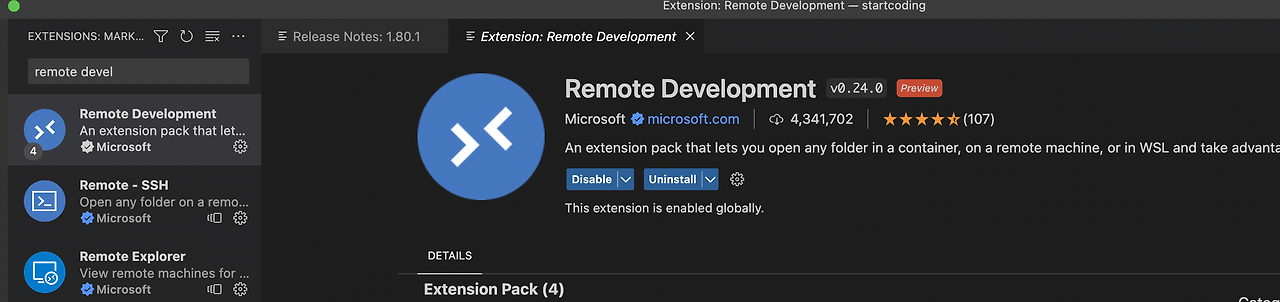
VS Code 에서 Docker continer 연동을 위해서 VS Code Extentions ( ctrl + Shift + X) 에서 Remote Development를 검색하여 install 합니다.
Dev Conatinaer: Remote-Containers: Attach to Running Container... 명령어로 현재 실행중인 container 를 보여주며 연결할 container 를 선택합니다.

로컬에서는 해당 컨테이너가 실행 중이라 더블 클릭하여 해당 컨테이너에 연결합니다.
원하는 container를 클릭하면 현재 새로운 VS Code 창이 뜨며 container가 연동되어 있는 VS code 창이 뜹니다.

'공부 > Docker' 카테고리의 다른 글
| [Docker] Docker image 삭제하는 방법 (0) | 2025.02.01 |
|---|---|
| [Docker] Docker 컨테이너 강제로 kill 시키는 방법 (0) | 2025.02.01 |
| [Docker] Docker image 목록 조회하기 (0) | 2025.02.01 |
| [Docker] Docker Hub 생성 및 이미지 업로드 (0) | 2023.08.06 |
| [Docker] MacOS 에 docker 설치하기 (0) | 2023.06.28 |